
PROFESSIONAL GRADE TOOLS

Stop Struggling with Grade Calculations!

Look, I get it. You’re staring at a syllabus that says your final is worth 35%, your midterm 25%, homework 20%, and participation 20%, and you’re trying to figure out what you actually need to score to keep your
99.9%

Accuracy Rate

1M+

Student Help

50K+

Teachers Trust Us

24/7

Always Available

Pro Grade Calculator

Walk into any teachers lounge mid-semester and you’ll catch the same scene: stacks of papers, a tired spreadsheet open on someone’s laptop, and grading tests stretching past dinner. Doing this manually is slow and genuinely error-prone, which is why a tool that automates the conversion of raw scores into clean letter grades matters more than people admit. Students, too, deserve immediate clarity. What sets this apart isn’t novelty, it’s the engineering. A smart AI-powered engine runs an intelligent algorithm that automatically detects errors and pushes suggestions to optimize your grade calculations with real precision. It’s lightning fast, delivering instant results the moment you type, and the mobile optimized, responsive design holds up across phone, tablet, computer

Weighted Grade Calculator

Enter assignments, grades, and weights to calculate your overall course grade.

Assignment (optional)
Grade
Weight (%)

📌 Final Grade Planning (optional)

Final Grade Calculator

Find out what score you need on your final exam.

GPA Calculator

Calculate your Grade Point Average.

Course (optional)
Grade
Credits

Simple Average Calculator

Calculate a quick non-weighted average.

Item (optional)
Grade (%)

How To Use The Grade Calculator

Getting started feels less like operating a tool and more like having a quiet conversation with your coursework. Open it on any device, punch in your question count alongside missed answers, and watch real-time results populate without clicking through endless menus. The interface respects your time, calculations appear instantly, and auto-save quietly preserves everything locally so you never lose your work. What I appreciate most after years of grading is the flexible grading options built into one place. Toggle between basic grading calculators or activate half-point (0.5) and quarter-point (0.25) scoring for detailed assessment scenarios. The custom grading scale table lets you mirror your institution’s grading policy precisely, while the visual grade distribution transforms raw score data into something genuinely easy to interpret.

Why Choose Pro Grade Calculator

Most teachers I’ve worked with abandoned their spreadsheet workflow within a week of switching. The reason isn’t speed alone, it’s the 99.9% accuracy rate that removes second-guessing during stacked grading tests. When you’re processing a 100-item final exam before parent meetings, having an intelligent companion that automates raw scores into numerical grades changes your entire afternoon rhythm completely. What separates this tool from generic manual calculations is how 50,000+ educators worldwide have shaped its evolution through real classroom feedback loops constantly. Whether you’re handling a quick 10-question pop quiz or partial credit scenarios across assignments, the easy grade calculator stays always available 24/7, delivering instant accurate results that genuinely reduce academic stress for 1M+ students helped annually.

Smart AI-Powered

Advanced AI algorithms deliver instant accurate calculations, learning patterns to predict and simplify complex problems.

Lightning Fast

Experience instant computations with optimized processing speed, delivering accurate results in milliseconds without any delays.

Mobile Optimized

Seamlessly designed for smartphones and tablets, ensuring smooth performance and responsive layouts across all devices.

Auto-Save

Never lose your calculations again with automatic saving that securely stores every entry and result.

100% Secure

Your data stays protected with encrypted processing, ensuring complete privacy and security for every calculation performed.

Visual Analytics

Transform numbers into clear charts and graphs, making complex data easy to understand and analyze instantly.

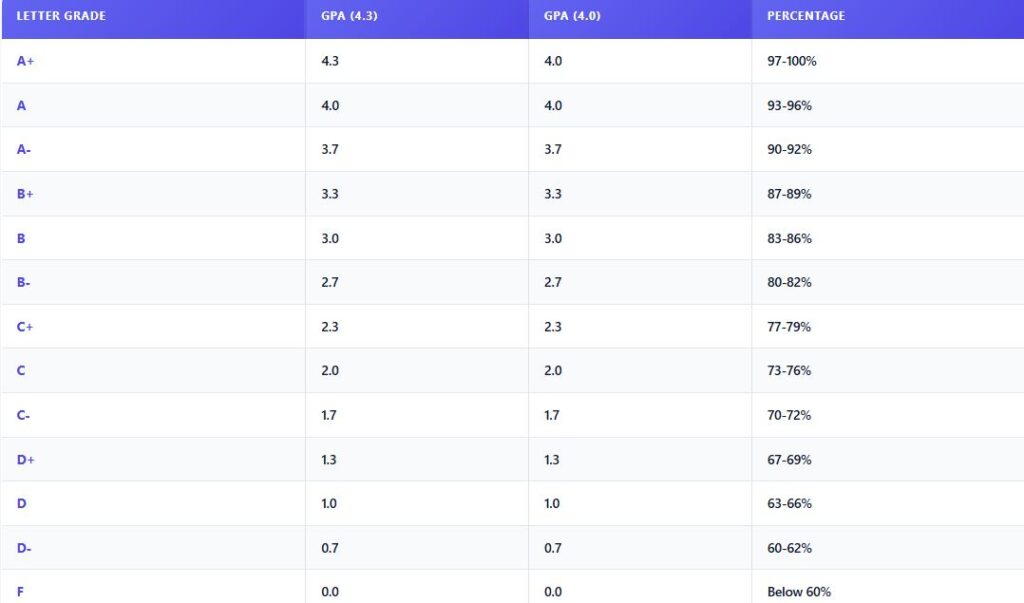
Letter Grading System / Grade Scale

Educators worldwide rely on the letter grading scale featuring A+, A, A-, B+ alongside all other grades, displayed through a unique visual grade bar.

Letter Garde Scale

Final Grade Calculator

Final exam weight reaches 40% while homework sits at 10%, so practitioners input potential scores to model different scenarios before semester closes. Track accumulated points across assessments, then calculate required scores intelligently.

Key Features

A pro grade calculator stands apart through its powerful features designed for accurate computation every time. It handles weighted averages alongside partial credit support, processes letter grades with numerical equivalents, and delivers instant results without loading screens. Visual analytics transform complex grade data into beautiful charts, while 100% secure local processing keeps your information never leaves device.

FAQ

Questions, Answered

Your overall course grades rarely come from individual test results alone. Most syllabi assign different weights across multiple assignments projects, midterms, participation, finals. A weighted grade calculator handles this by multiplying each component’s score by its assigned percentage, then summing the totals. Combine quiz scores with weighted exams for accurate semester predictions before grades finalize.

Absolutely. This calculator stretches well beyond tests and quizzesTeachers lean on it for essay questions with multiple parts, lab reports, and projects requiring partial creditStudents find it handy for individual assessmentshomework, and midterm prep. The flexibility across subjects means any assignment with numerical inputs converts cleanly into percentage and letter grade outputs.

Absolutely, and here’s where most students miss the bigger picture. This calculator handles your overall grade computation by combining weighted grades across every assignment. Multiply each assignment’s score by its weight percentage, then sum the results. Example: a 90% worth 40% plus an 80% worth 60% processes automatically.

Adjust the minimum thresholds anytime through the flexibility built into our calculator. Most institutions follow the default letter grading scale, but teachers managing AP tests or licensing exams often need customizable scalesModify the passing grade boundary, letter grades, or percentage grades to align with your specific grading policy requirements without limitations.

Students wanting progress must plan ahead with confidence. Track each course grade alongside quiz scores and assignment percentages, then convert weak spots into study goals. Use a grade calculator to calculate required scores before final exams. Smart study practice, consistent effort across all subjects, tracking semester progress, plus reviewing letter grades monthly drives real GPA improvement.

Absolute privacy stays intact since this quiz grade calculator performs calculations entirely locally within your browser. Your sensitive academic data never leaves device memory during operation. Nothing transmits externally—no data sent toward external servers, ever. Personal grading information remains exclusively yours, untouched by third parties or cloud-based vulnerabilities.

Honestly, after years of helping students sort this out, the distinction clicks fastest through a real scenario. Unweighted treats every assignment equally, while weighted grades account for how much each piece counts toward your overall grade. Picture (80 × 0.40) + (90 × 0.60) = 32 + 54 = 86% versus a flat test average.